AI baby generator app you install from the browser
Our AI baby generator app is a website, not a store download. Open it in your phone browser and use it right away, or add it to your home screen from the browser menu. Then it opens in its own window like an app. There is no App Store or Google Play version, and no trial that renews.
By The Cradlepeek team (Product and testing). Last updated .
Parent 1
A clear photo, one face, looking at the camera
Parent 2
Optional: leave it empty for a one parent portrait
JPG, PNG or WebP, up to 12 MB each.
We delete both photos as soon as the portrait is made. Only upload photos of yourself and of a partner who agreed to it. The result is an imagined likeness for fun, not a genetic prediction.
How to install the AI baby generator app, step by step
First, open this page in Safari on iPhone or Chrome on Android.
Then open the share or browser menu.
Next, tap Add to Home Screen or Install app.
After that, open the new icon and add one or two parent photos.
Finally, pick an age and a gender, and look at the free preview.
The first 2 previews each day are free. After that, see the pricing page for packs and plans, or read how we test the tool.
AI baby generator app tested with real photo files
We sent our own test photos through the same prompt this page uses. The parents are illustrative: an image model made those photos, so they show no real people. Below, the parents sit on the left and the child on the right, so you can judge the likeness yourself.
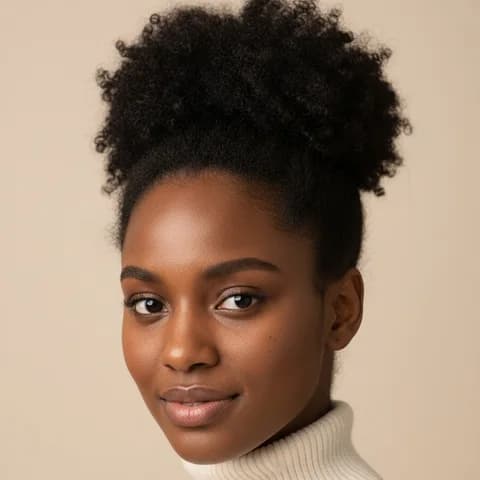

- Test photos
- One illustrative parent photo (mom of couple 2)
- Result
- Child at 1 year
- Age
- 1 year
- Gender
- Surprise me
- Parent photos
- 1
- HD file
- 2048 x 2560 px JPG
- Print size at 256 dpi
- 8 x 10 in
- Free preview
- 1024 x 1280 px, watermarked
- Made by
- gemini-2.5-flash-image
- Prompt
- 180 words
- HD file size
- 599 KB
How we test: every age and option gets the same test parents, and we compare each child with both photos by hand. More on the about page.
Is there an AI baby generator app in the stores?
No, not from us. We do not have an App Store or Google Play app. Instead, the site itself is a web app, also known as a PWA.
That means your browser can install it. On iPhone, you use Add to Home Screen in the Safari share menu. On Android and desktop Chrome, the menu offers Install app. After that, the icon opens the tool in its own window, without the address bar.
Also, on Android the installed app can show up in the share menu for photos. So you can send a parent photo straight from your gallery. Still, it needs an internet connection, because the portrait comes from an online image model.
Why a web app instead of a store app
First, privacy. A store app often asks for access to your whole photo library. In the browser, however, the page sees only the photos you pick for that one upload.
Second, what happens to them. Your photos stay in memory for one request and go to Google, the image model provider. After the response, we keep neither the photos nor the portrait.
Third, there is nothing to update or uninstall in a hurry. If you are done, delete the icon or simply close the tab. In addition, there is no account that keeps your data after you leave.
Subscription traps in AI baby generator apps
Many baby tools make money with a short trial. For example, the original tool we studied charges $2.99 for three days and then renews at $19.99 a month. In addition, it promotes an iOS app.
That model explains a common search: how to cancel a baby face generator subscription. With a store app, you usually cancel in your phone's subscription settings. However, deleting the app alone does not stop the payments.
Here, the setup is simpler. You get two free previews a day with no account. After that, a pack of 10 credits costs $6.99 one time, or a monthly plan gives 60 credits for $9.99 and you can cancel at any time.
Our single photo test, and when the app is the wrong choice
We tested with one illustrative photo made by an image model, so no real person appears. It shows a woman with dark brown skin, black coily hair in a puff and dark brown eyes. With one photo, the prompt mixes her face with ordinary features of a second parent it cannot see.
With 1 year and surprise me, the baby came back smiling, with chubby cheeks and a few small first teeth. The baby has dark brown skin, short coily dark hair and dark eyes, and wears a plain cream top.
As expected, the child looks like the mom. However, the tool is not the right choice if you want a firm answer. It cannot see genes, so treat every portrait as a fun guess, and only upload your own face or a partner who agreed.
Web app versus store app
| Item | This web app |
|---|---|
| Store download | None, no App Store or Google Play version |
| Install | Add to Home Screen or Install app from the browser |
| Photo access | Only the photos you pick |
| Account | Not needed for the preview |
| Free previews | 2 a day, 1024 x 1280 px with a watermark |
| HD file | 2048 x 2560 px JPG for one credit |
| Trial | None, nothing renews by itself |
| Works offline | No, the portrait needs an internet connection |
AI baby generator app FAQ
Is there a free AI baby generator app?
Our web app is free for two previews a day. You install it from the browser, and you do not need an account or a card.
Is the AI baby generator app on the App Store?
No. We have no App Store or Google Play app. Instead, add the site to your home screen from Safari or Chrome.
How do I add the web app to my iPhone?
First, open the site in Safari, tap the share button and choose Add to Home Screen. Then open it from the new icon.
How do I cancel a baby generator app subscription?
For a store app, cancel it in your phone's subscription settings before the trial ends. Also, deleting the app does not cancel it.
Can the app make a baby from one photo?
Yes. With one parent photo, the prompt adds ordinary features of a second parent it cannot see. So the child looks mostly like that one parent.
Is the app safe for my photos?
Your photos go to Google, the image model provider, for one request. After that, we keep neither the photos nor the result.