AI baby generator couple tool for two partners
This AI baby generator couple tool needs one photo of each partner. Upload both, pick an age from newborn to 13, and choose a girl, a boy, twins or a surprise. The model then mixes your faces into one realistic child. First check the free watermarked preview, and then decide if the HD file is worth a credit.
By The Cradlepeek team (Product and testing). Last updated .
Parent 1
A clear photo, one face, looking at the camera
Parent 2
Optional: leave it empty for a one parent portrait
JPG, PNG or WebP, up to 12 MB each.
We delete both photos as soon as the portrait is made. Only upload photos of yourself and of a partner who agreed to it. The result is an imagined likeness for fun, not a genetic prediction.
How to use the AI baby generator as a couple, step by step
First, pick one clear photo of each partner, one face per photo, looking at the camera.
Then upload them into the two circles. Either order works.
Next, choose an age. Newborn is set by default on this page.
After that, choose a girl, a boy, twins or let the tool surprise you.
Finally, look at the free preview together before you spend a credit.
The first 2 previews each day are free. After that, see the pricing page for packs and plans, or read how we test the tool.
AI baby generator couple tested with real photo files
We sent our own test photos through the same prompt this page uses. The parents are illustrative: an image model made those photos, so they show no real people. Below, the parents sit on the left and the child on the right, so you can judge the likeness yourself.
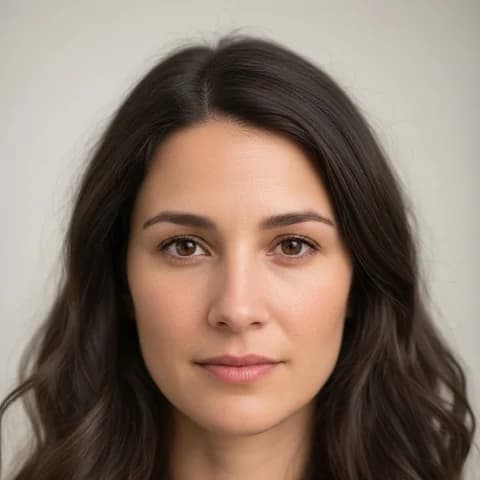
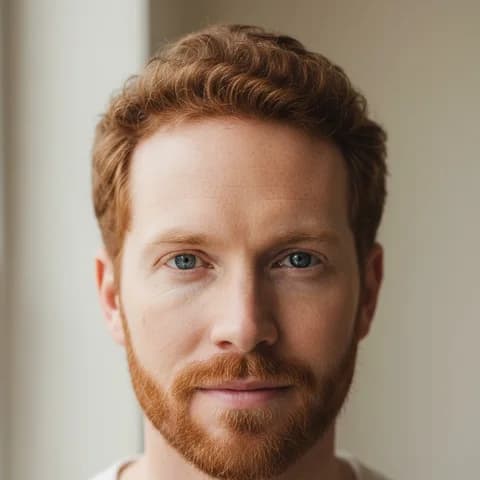
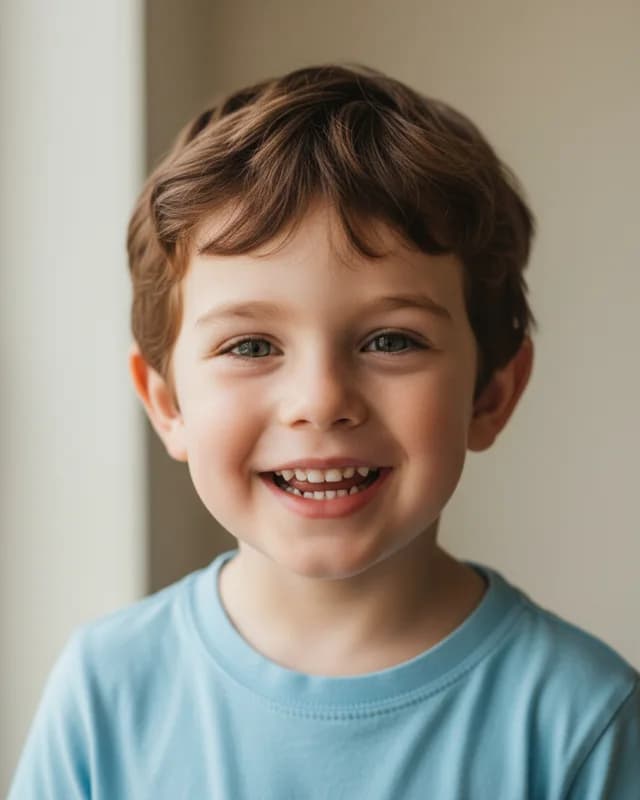
- Test photos
- Two illustrative parent photos (couple 1)
- Result
- Child at 3 years, boy
- Age
- 3 years
- Gender
- Boy
- Parent photos
- 2
- HD file
- 2048 x 2560 px JPG
- Print size at 256 dpi
- 8 x 10 in
- Free preview
- 1024 x 1280 px, watermarked
- Made by
- gemini-2.5-flash-image
- Prompt
- 148 words
- HD file size
- 649 KB
How we test: every age and option gets the same test parents, and we compare each child with both photos by hand. More on the about page.
Why a couple needs two separate photos
The tool reads two photos, one per partner. So each of you gets a whole photo to yourself, with your face large and sharp. That gives the model more detail than one photo of the two of you, where both faces are small.
A good photo is simple. Look straight at the camera, with even light and no sunglasses. In addition, a plain background helps, although the model replaces it anyway. Hats, heavy filters and side profiles hide exactly the features the prompt asks the model to mix.
One partner can also skip the upload. In that case, the prompt mixes one parent with ordinary features of a second parent we do not see. Still, two photos give the result that looks most like both of you.
What our test couple got from the AI baby generator
We tested with two illustrative photos made by an image model, so they show no real people. The first shows a woman with long wavy dark brown hair and brown eyes. The second shows a man with short curly red hair, a trimmed beard and blue eyes.
At 3 years with boy, the child came back with her brown hair and his light eyes. His smile is wide and open, and he wears a plain blue T-shirt in soft window light. Overall, he reads as a mix, which is what a couple hopes to see.
However, our second test couple did not mix as well. In most of their portraits, the child looked mostly like the mom. Therefore, always compare the preview with both photos before you pay.
Choosing an age and a gender as a couple
Newborn is the classic first look, wrapped in a knitted blanket. Meanwhile, 1 year shows chubby cheeks and first teeth, and 3 years shows a toddler grin. For school age or a teen, pick 6 or 13 years.
Gender works the same way. Girl and boy are fixed choices, while Surprise me lets the model decide. Twins puts two children of the same age side by side, cheek to cheek.
Each choice is a new portrait. So the same couple at 1 year and at 6 years will not show the exact same child. If you want a set, make every age and keep the ones you both like.
When this tool is not the right choice for a couple
First, it is not a prediction. Eye color, hair color and many other traits depend on several genes, and a photo shows none of them. As a result, a real child can look very different from the portrait.
Second, both partners should agree. Please do not upload a photo of a crush, an ex or a celebrity. Our terms allow only your own photo and a photo of a partner who said yes.
Finally, it is a digital file only. For a framed print or a reveal card, take the HD file to a print lab or a design app afterward.
Couple portrait limits and files
| Item | Details |
|---|---|
| Photos | One per partner, JPG, PNG or WebP, up to 12 MB each |
| One partner only | Works, the second photo is optional |
| Ages | Newborn, 1 year, 3 years, 6 years, 13 years |
| Gender | Girl, boy, twins or surprise me |
| Shape | Vertical 4:5 portrait |
| Free preview | 1024 x 1280 px WebP with a watermark, 2 a day, no account |
| HD file | 2048 x 2560 px JPG, no watermark, one credit |
| Credits | 10 for $6.99 one time, or 60 a month for $9.99 |
AI baby generator couple FAQ
Is there an AI baby generator couple tool for free?
Yes. You get two free previews a day here, with no account. Each one is 1024 x 1280 px with a watermark. The clean HD file then costs one credit.
Can we use one photo of us together?
No. The tool expects one face per photo. So crop your shared photo into two, one per partner, and upload each half into its own circle.
Who does the baby look like more?
It varies. With our first test couple, the child mixed both parents well. With the second couple, the model leaned toward the mother. Try a second preview if one partner is missing.
Does the order of the photos matter?
It can. In our tests, the model sometimes leaned toward the first photo. So if the child looks only like one of you, swap the circles and try again.
Can same sex couples use it?
Yes. The prompt simply says two parents. It does not ask who is the mother or the father, so any two adults work.
Do you keep our photos?
No. Both photos stay in memory for that one request and go to the image model provider, Google. After the response, neither the photos nor the portrait are stored.