Baby generator from one photo, for one parent
This baby generator works from one photo of one parent. Leave the second circle empty, pick an age and a gender, and the model draws a child with your features. It mixes them with ordinary features of a second parent it never sees. So the child will mostly look like you.
By The Cradlepeek team (Product and testing). Last updated .
Parent 1
A clear photo, one face, looking at the camera
Parent 2
Optional: leave it empty for a one parent portrait
JPG, PNG or WebP, up to 12 MB each.
We delete both photos as soon as the portrait is made. Only upload photos of yourself and of a partner who agreed to it. The result is an imagined likeness for fun, not a genetic prediction.
How to use the baby generator from one photo, step by step
First, upload one clear photo of yourself, looking at the camera.
Then leave the second circle empty. The tool runs fine without it.
Next, pick an age from newborn to 13 years.
After that, choose a girl, a boy, twins or Surprise me.
Finally, check the free preview next to your photo.
The first 2 previews each day are free. After that, see the pricing page for packs and plans, or read how we test the tool.
Baby generator from one photo tested with real photo files
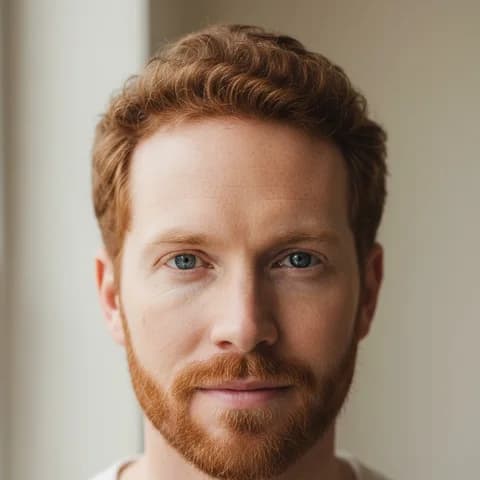
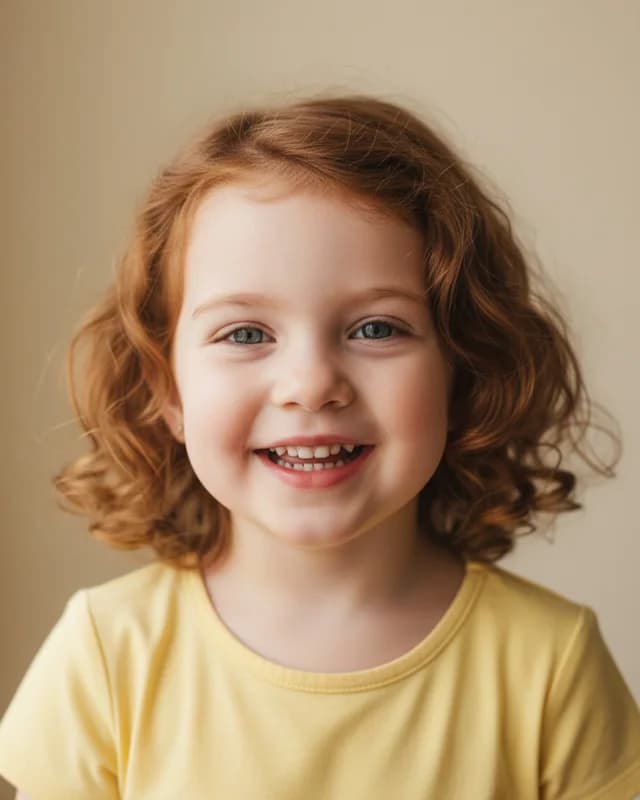
We sent our own test photos through the same prompt this page uses. The parents are illustrative: an image model made those photos, so they show no real people. Below, the parents sit on the left and the child on the right, so you can judge the likeness yourself.
- Test photos
- One illustrative parent photo (dad of couple 1)
- Result
- Child at 3 years, girl
- Age
- 3 years
- Gender
- Girl
- Parent photos
- 1
- HD file
- 2048 x 2560 px JPG
- Print size at 256 dpi
- 8 x 10 in
- Free preview
- 1024 x 1280 px, watermarked
- Made by
- gemini-2.5-flash-image
- Prompt
- 163 words
- HD file size
- 695 KB
How we test: every age and option gets the same test parents, and we compare each child with both photos by hand. More on the about page.
Who a baby generator from one photo is for
Most baby tools ask for two parents. However, plenty of people only have one face to share. Single parents by choice, donor families and people whose partner is away all fit here. Some people also just want to see a mini version of themselves.
In these cases, a second photo would be a guess anyway. For example, a donor profile rarely has a clear face photo, and we do not allow photos of anyone who did not say yes. So the tool lets you skip the second parent on purpose.
One more case comes up often. If you only have a photo of the two of you together, crop it into two photos instead. The tool expects one face per photo, so a shared photo does not count as one parent.
How the one photo prompt works
With two photos, the prompt says the two photos show two parents. With one photo, it changes. It says the photo shows one parent, and it asks the model to mix that parent with ordinary features of a second parent we do not see.
The rest of the prompt stays the same. It still asks for a real photo look, a single child, soft window light and a plain warm background. Meanwhile, your age and gender choices work exactly as they do for couples.
Because the second parent is a blank, the model leans on you. As a result, the child usually carries your hair, eyes and skin tone. Expect a family likeness to you rather than a balanced mix.
What our baby generator from one photo test got
We tested with illustrative parents from an image model, so they show no real people. For one run, we used only the dad: short curly red hair, a trimmed red beard, blue eyes and fair skin.
At 3 years with girl, she came back with wavy copper red hair to her shoulders and blue gray eyes. She has a wide smile with small even teeth and wears a pale yellow T-shirt. Clearly, she reads as his daughter.
We also ran a mom alone at 1 year with Surprise me. The baby has her dark brown skin, short black coily hair and dark eyes, with a big smile and two small teeth. Again, the child looked like the one parent we sent.
Limits of a one parent portrait
First, the unseen parent is not anyone real. The model fills that side with plain, average features. So if you know the other parent has red hair or very dark eyes, the portrait will not show it.
Second, it is still not a prediction. Traits like eye color depend on several genes, and one photo shows even less than two. As a result, a real child can look very different from the portrait.
Finally, please upload only your own photo. Our terms do not allow photos of children, celebrities or anyone who did not agree, even in one parent mode.
One parent mode at a glance
| Item | Details |
|---|---|
| Photos needed | One, the second circle stays empty |
| Who it suits | Single parents, donor families, partner not available |
| Second parent | Ordinary features of a parent the model never sees |
| Likeness | Leans toward the one parent you upload |
| Ages | Newborn, 1 year, 3 years, 6 years, 13 years |
| Gender | Girl, boy, twins or surprise me |
| Free preview | 1024 x 1280 px WebP with a watermark, 2 a day |
| HD file | 2048 x 2560 px JPG, one credit |
Baby generator from one photo FAQ
Can a baby generator work from one photo?
Yes. Upload one parent and leave the second circle empty. The model then mixes your features with ordinary features of a second parent it never sees.
Will the baby look only like me?
Mostly, yes. In our tests, both one parent runs looked clearly like the parent we sent. The unseen side adds plain features, not a real person.
Can I use a photo of me and my partner together?
Not as one upload. The tool expects one face per photo. So crop the shared photo into two, one per person, and fill both circles.
Is the baby generator from one photo free?
Yes. You get two free previews a day with no account. Each one carries a watermark, and the clean HD file costs one credit.
Can donor families use it?
Yes. Upload the parent who wants to see the likeness and leave the donor side empty. Please do not upload a donor photo unless that person agreed.
Can I turn my own face into a baby?
Not exactly. The tool draws a new child who looks like you, not a younger copy of your face. For a you as a baby effect, a face filter app fits better.